
Huidu H6 Smart Multimedia Player with Six-Port LED Display Controller for LED Advertising Screen


Product Features
Input:
Output:
Features:
Appearance Description

| Name | Interface | Illustrate |
| RUN | Operating systemindicator light | Green light flashing: The operating system is running normally
The green light is always on or off: The operating system is running abnormally |
| Wi-Fi AP | AP Indicator | The light is off: AP mode is not enabled or abnormal
Green light flashes: AP mode is normal Red light flashes: AP mode is abnormal |
|
Wi-Fi STA |
STATION indicator |
Red light is always on: STA mode is turned on but the router is not bridged
Yellow light is always on: the bridge is connected to the router, but not to the cloud server. Green light is always on: the router is bridged and connected to the cloud server Red light flashes or is off : STATION abnormality
|
|
4G/5G |
4G/5G indicator |
Red light flashing: No SIM card detected
Red light is always on: SIM card is in arrears or there is no signal Yellow light is on: The mobile network is normal, but the cloud server is not connected. Green light is always on: The mobile network is normal and connected to the cloud server |
| HDMI LOOP | Signal source button light | Light off: The current signal source is not in HDMI LOOP mode
Green light is always on: Synchronous mode, the input source is normal Green light flashes: Synchronous mode, detect input source abnormality |
| HDMI IN | Signal source button light | The light is off: The current signal source is not in HDMI IN mode
Green light is always on: Synchronous mode, the input source is normal Green light flashes: Synchronous mode, detect input source abnormality |
| ASYNC | Synchronous and asynchronousswitching button light | The light is off: The current signal source is not in ASYNC mode
Green light is always on: asynchronous playback |
| NEXT | NEXT button | Default program switching function, the software can be set to screen test function |
| USB 3.0 | U disk interface | Material storage , program update , firmware upgrade or capacity expansion |
| IR | IR signal receiving head | Infrared remote control signal reception, no infrared indicator light, recommended operation within 10 meters |
| ON/OFF | Power switch button | Press the button inward: the device turns on and the power button light is always on
The button bounces outward: the device is turned off and the power button light is off |
Rear Panel:

| Name | Interface | Illustrate |
| SENSOR | Sensor interface | TTL level interface, connect external sensor accessories, such asenvironmental monitoring, multi-function sensor or GPS, etc. |
|
RELAY |
Relay interface |
2PIN Phoenix terminal, reserved relay interface;R1, R2: relay switch signal; 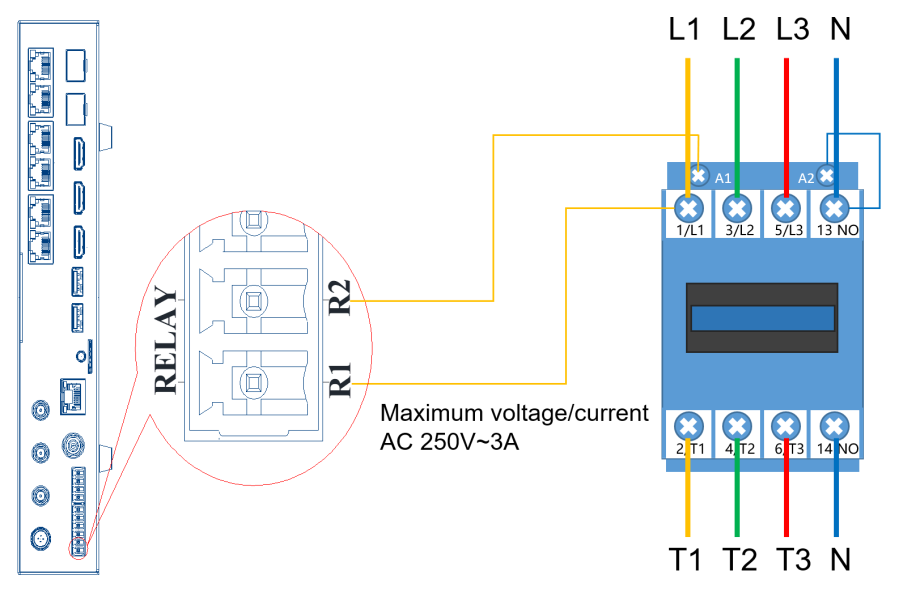 |
| RS485 | RS485 interface | 4PIN Phoenix terminal, supports central control protocolV: 3.3V positiveA: 485 A positive terminal
B: 485 B negative terminal G: GND power negative pole |
| RS232 | RS232 interface | 4PIN Phoenix terminal, supports central control protocolV: 3.3V positiveTX: Send data
RX: Receive data G: GND power negative pole |
| DC 5-12V | Power interface | 5V 6A ,12V 3A |
| Wi-Fi AP | Antenna interface x2 | For connecting Wi-Fi/Bluetooth antenna |
| Wi-Fi STA | Antenna interface x1 | For connecting Wi-Fi antenna |
| 4G/5G | Antenna interface x1 | For connecting 4G/5G antenna |
| LAN IN | Input network port | Gigabit network port, communicate with the outside world via TCP/UDP |
| SIM | SIM card slot | Installing the Micro SIM Card |
| AUDIO | Audio Interface | TRS 3.5mm standard dual-channel audio output port |
| RECOVERY | Factory reset button | The button is inside the audio port. When the device is powered on, use a thin object (toothpick) to pass through the AUDIO port and press the RECOVERY button inside for 20 seconds and then release it to enter the factory reset. |
| USB2.0 | USB interface | Material storage, program update, firmware upgrade or capacityexpansion |
| OTG | USB interface | USB3.0 material storage, program update, firmware upgrade or capacity expansion (default USB flash drive function, factory configurable) |
| HDMI IN | Signal source
input interface |
HDMI1.4 interface, supports adaptive scalingRecommended resolution 1920×1080@60HzMaximum resolution 3840×2160@30Hz
Minimum resolution 800×600@60Hz Support custom resolution Support HDCP 1.4 |
| HDMI LOOP | Signal sourceinput interface | HDMI1.4 interface, synchronous signal input or splicing input interfaceMaximum resolution 2048×1152@60HzMinimum resolution 800×600@60Hz
Support custom resolution |
| HDMI OUT | Signal source output interface | HDMI1.4 interface, used for cascade data loop-out or image monitoring |
| SFP IN | Optical module input interface | Cascade signal input, cascade H6 devices for splicing display |
| SFP OUT | Optical module output interface | Cascade signal output, used as the data source of the SFP IN of the next deviceLong distance transmission cascade FT08 copy display (special firmware required) |
| Networkports 1-6 | Output network port | 6-way RJ45 output network port, cascaded HD receiving card display |
Dimensions


Product Specifications
| Electricalparameters | Input Power | DC 5V-12V ( 5V 6A, 12V 3A) |
| Maximum power consumption | 21W | |
| Storage Space | Running Memory | 4GB |
| Internal Storage | 64GB | |
| StorageEnvironment | temperature | -40℃~80℃ |
| humidity | 0%RH~80%RH (no condensation) | |
| WorkEnvironment | temperature | -40℃~70℃ |
| humidity | 0%RH~80%RH (no condensation) | |
| Size | 289.2mm×141mm×44mm (including mounting ears) | |
| Net weight | 1.30KG | |
| Protection level | IP20Please note that it is waterproof, such as preventing water from dripping into the product, and do not wet or rinse the product | |
| System Software | Android11.0 operating system softwareAndroid terminal application software FPGA software | |
|
Packaging Information |
Packing List:1×H6
1 ×Power Adapter 1 ×HDMI cable 3×Wi-Fi antenna 1×Bluetooth remote control 1×certificate of conformity |
Optional List
| Fiber Optic Module | SFP optical module, used for optical port cascading splicing |
| Fiber Optic Cable | Optical fiber lines, used for long-distance signal transmission |
| Wireless screen projection code | Screen projection authorization code, used after the screen projection function is activated |
| USB screen projector | Wireless screen projection device, plug and play, you need to activate the device before use |
| 4G/5G Module | Optional 4G/5G modules according to different regions, used with 4G/5G antennas |
Application Scenarios

Illustrate:
1. For details of the H6 smart multimedia player box product package in the application scenario diagram, please refer to the packing list.
2. Optional equipment not included in the scene diagram needs to be ordered separately. If you have any questions, please contact our business colleagues.
Products categories
-

Huidu B8L Professional LED Poster Screen Contr...
-

Huidu W04 Single Color Wi-Fi LED Display Contro...
-

Huidu T902×1 LED Display Synchronous Sending Bo...
-

Huidu VP8000M Multi-image Splicing Processor fo...
-

Huidu W62 Cost-effective LED Control Card with ...
-

Huidu T08F 4K Synchronous Sending Box Support 2...


