
Huidu LED Controller VP820A Two in One Video Processor for Full Color LED Video Wall Display Screen
.jpg)
.jpg)
.jpg)
Connection Diagram
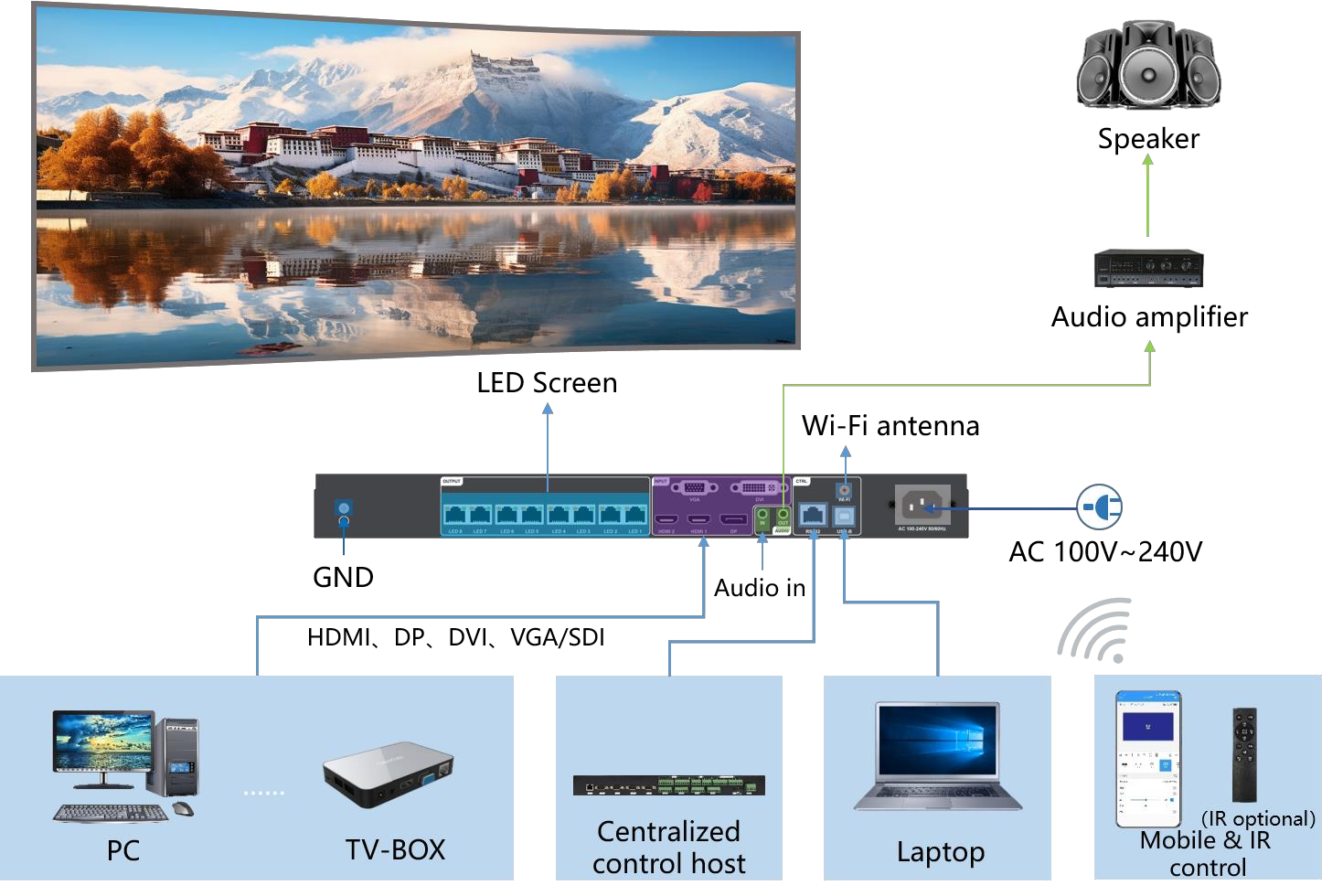
Product Characteristics
Input
. Supports up to 4096*2160 @60Hz synchronous signal input ;
. Supports 2-channel HDMI, 1-channel DP, 1-channel DVI, and 1-channel VGA signal input, and can switch
multiple video signals at will;
. Supports 1-way TRS 3.5mm standard two-channel audio input and HDMI/DP audio input.
Output
. Supports two-screen layout, maximum support 2×4K windows;
. Standard 8-channel Gigabit Ethernet port, cascaded with receiving card;
. The maximum control is 5.2 million pixels, the maximum horizontal support is 8192 pixels, and the
maximum vertical support is 4000 pixels ;
. 1 TRS 3.5mm standard two-channel audio output.
Function
. Video signals can be switched, cropped, and scaled at will;
. Support 16 scene presets and calls ;
. Support brightness adjustment, color temperature adjustment and key lock functions ;
. Support arbitrary overlapping of network ports and non-rectangular load;
. Support point-to-point display and limited to full conversion;
. Support RS232 serial port protocol control and docking with central control equipment;
. Support Wi -Fi Station mode, AP mode, Wi-Fi Station + AP mode;
. Support mobile phone APP wireless control;
. Support infrared remote control (optional).
. Support SDI (optional);
. Support 4G (customized).
Appearance
Front panel:
Standard front panel:

SDI front panel:
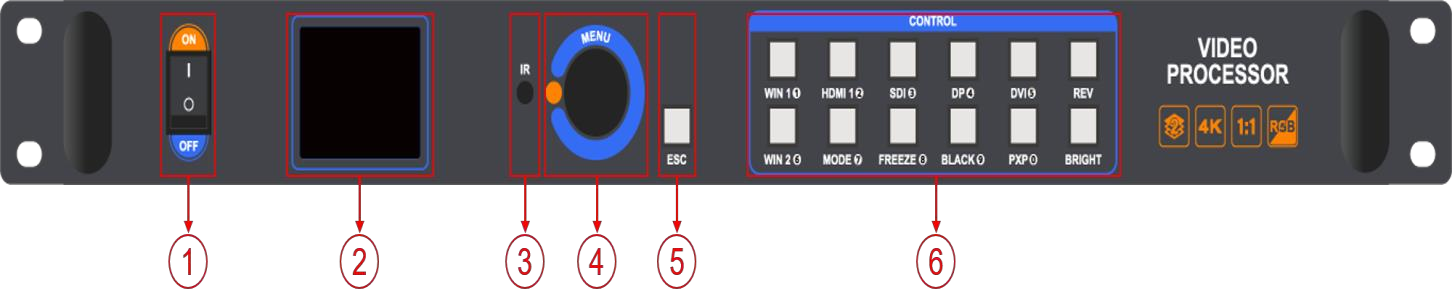
4G model front panel:
| Key Description | ||
| Serial number | button | illustrate |
| 1 | Power switch | Control AC power input |
| 2 | LCD display screen | Debug display menu, screen parameters and other information |
| 3 | IR | Receive infrared remote control (optional) |
| 4 | MENU knob | Press the knob to enter a submenu or confirm a selection
Rotate the knob to select menu items or adjust parameters |
| 5 | ESC | Exit key /Back key |
| WIN1~WIN2 | Select an open window | |
|
6 |
Function key: The key multiplexing function is digital selection, generally used when setting the resolution | |
|
HDMI1 |
Select HDMI 1 signal playback
Function key: The key multiplexing function is digital selection, generally used when setting the resolution |
|
|
HDMI2 |
Select HDMI 2 signal playback
Function key: The key multiplexing function is digital selection, generally used when setting the resolution |
|
|
DP |
Select DP signal to play
Function key: The key multiplexing function is digital selection, generally used when setting the resolution |
|
|
DVI |
Select DVI signal playback
Function key: The key multiplexing function is digital selection, generally used when setting the resolution |
|
| VGA(REV) | Select VGA signal playback ( SDI/4G models do not have VGA, and the REV button is reserved but has no actual function) | |
|
MODE |
Quickly call up the preset mode call menu
Function key: The key multiplexing function is digital selection, generally used when setting the resolution |
|
|
FREEZE |
click freeze button
Function key: The key multiplexing function is digital selection, generally used when setting the resolution |
|
|
BLACK |
One-touch black screen button
Function key: The key multiplexing function is digital selection, generally used when setting the resolution |
|
|
PXP |
Quickly enter the two- screen layout menu
Function key: The key multiplexing function is digital selection, generally used when setting the resolution |
|
| BRIGHT | Quickly call out the brightness setting button |
Rear panel:
Standard rear panel:

SDI model rear panel:
4G model rear panel:
| Input Interface | |||
| Serial number | Interface Name | quantity | illustrate |
|
3 |
DP1.2 |
1 |
DP input interface
Interface type: DP Signal standard: DP1.2 backward compatible Resolution: VESA standard, ≥720×480@60Hz, ≤4096×2160@60Hz Support audio input |
| HDMI1~2 |
2 |
HDMI 2.0 input interface × 1 (HDMI 1)
Interface type: HDMI-A Signal standard: HDMI 2.0 backward compatible Resolution: VESA standard, ≥800×600@60Hz, ≤4096×2160@60Hz Support audio input HDMI 1.4 input interface × 1 (HDMI 2) Interface type: HDMI-A Signal standard: HDMI 1.4 backward compatible |
|
| Resolution: VESA standard, ≥800×600@60Hz, ≤
4096x2160@30Hz Support audio input |
|||
|
DVI |
1 |
DVI input interface
Interface type: DVI-I socket Signal standard: DVI1.0, HDMI1.3 backward compatible Resolution: VESA standard, ≥800×600@60Hz, ≤ 1920×1200@60Hz |
|
|
VGA |
1 |
VGA input
Interface type: DB15 socket Signal standard: R, G, B, Hsync, Vsync: 0 to1Vpp±3dB (0.7V Video+0.3v Sync) 75 ohm black level: 300mV Sync-tip: 0V Resolution: VESA standard, ≥720×480@60Hz, ≤1920× 1080@60Hz |
|
|
SDI |
1 |
SDI Input
Interface type: BNC Signal standards: SD-SDI, HD-SDI, 3G-SDI Resolution: VESA standard, ≤1920×1080@60Hz |
|
| 4 | AUDIO IN | 1 | TRS 3.5mm dual channel audio input interface |
| 6 | power supply | 1 | AC 100 ~ 240V 50/60Hz |
| Output Interface | |||
| Serial number | Interface Name | quantity | illustrate |
| 1 | Grounding interface | 1 | Anti-static/leakage protection, personal safety protection and
equipment normal operation protection |
| 2 | Gigabit Ethernet | 8 | Used for cascading receiving cards, transmitting RGB data
stream, each network port controls 650,000 images, supports docking multi-function cards |
|
3 |
SDI-LOOP |
1 |
SDI signal loop-out interface
Interface type: BNC Signal standards: SD-SDI, HD-SDI, 3G-SDI Resolution: VESA standard, ≤1920x1080@60Hz |
| 4 | AUDIO OUT | 1 | TRS 3.5mm dual-channel audio output interface
Connect to an audio amplifier for high-power external speakers |
| Control interface | |||
| Serial number | Interface Name | quantity | illustrate |
| 3 | SIM card slot | 1 | SIM card slot
Currently only standard cards are supported: size W×H×D/ 25mmx15mmx0.8mm |
|
5 |
RS232 | 1 | RJ45 interface, connected to the central control device |
| USB-B | 1 | Connect to a computer for debugging the device | |
| Wi-Fi antenna interface | 1 | Connect a Wi-Fi antenna to enhance Wi-Fi signal | |
| 4G antenna interface | 1 | Connect a 4G antenna to enhance 4G signal | |
Dimensions
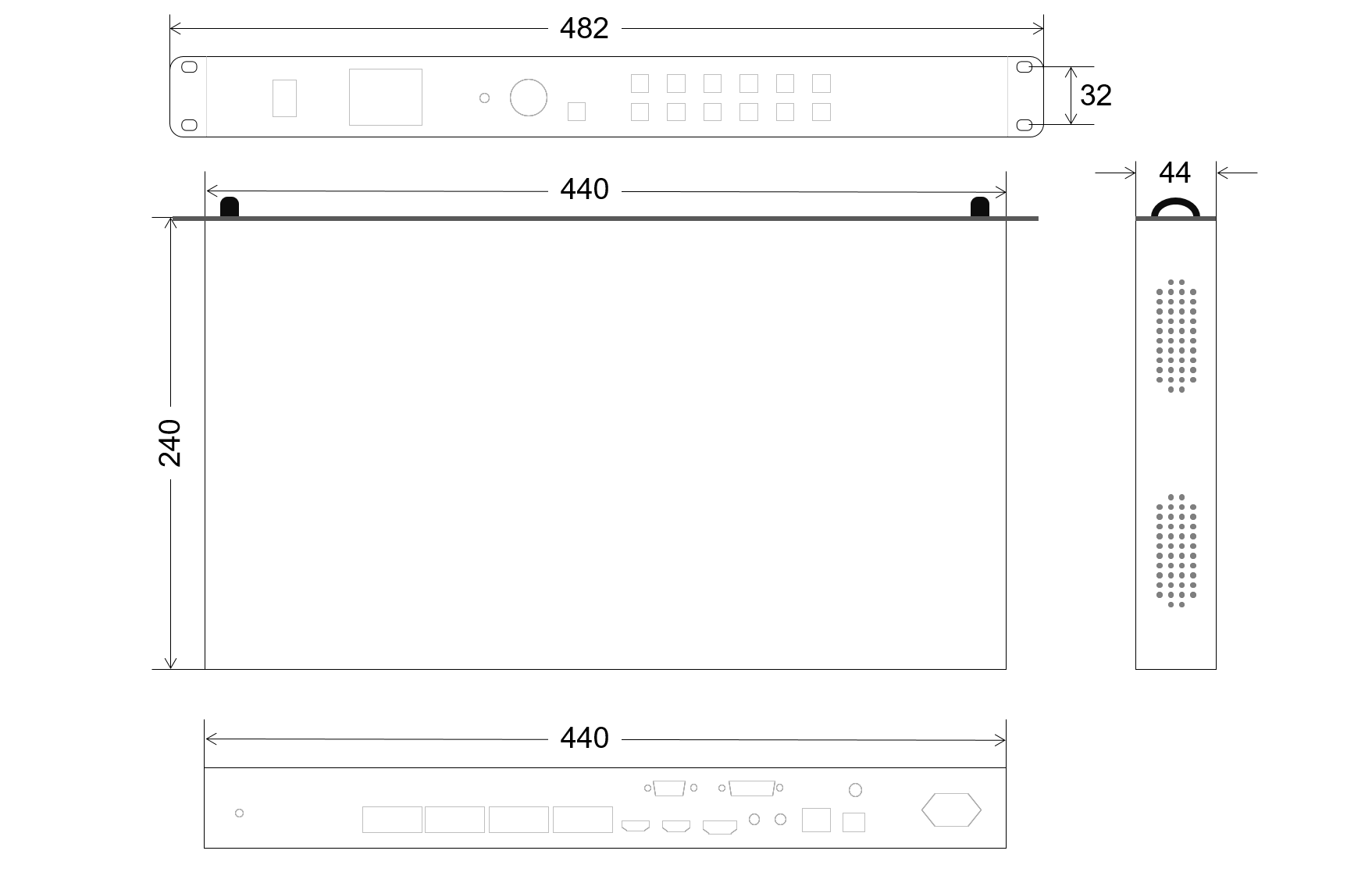
Basic Parameters
| Parameters | Parameter Value | |
| Chassis specifications | 1U Standard | |
| Electrical specifications | power supply | AC 100~240V 50/60Hz |
| Power consumption | 50W | |
| Work Environment | Operating temperature (。C) | 20 ℃ ~55 ℃ |
| Operatinghumidity (RH) | 20%RH~90%RH (no condensation) | |
| Storage Environment | Storage temperature (℃) | -20 ℃ ~60 ℃ |
| Storage humidity(RH) | 10%RH~95%RH (no condensation) | |
| Equipment Specifications | size | W×H×D/482mm×44mm×240mm |
| net weight | 2.9kg | |
| Packing specifications | Packing size | W×H×D/ 515mm×82mm×355mm |
| Packing weight | 4 kg | |
Products categories
-

Huidu R507T Receiving Card LED Control Card for...
-

Huidu LED Controller VP1620C Two in One LED Vid...
-

Huidu T08F 4K Synchronous Sending Box Support 2...
-

Huidu HDP703 Multifunctional LED Video Processo...
-
Huidu R512T Receiving Card LED Display Controller
-
Huidu A5 Dual Mode LED Media Player Sending Box...


